

First of all, what is v4?!
V4 is a complete rebuild of our software to not only release new features and tools, but to improve functionality across the board and move to a platform that will allow us to be more agile and responsive to your requests for even more.
So, what's new in v4?
There are so many new features that we can't pack them into this answer! Please check out our v4 blog, or request access to see for yourself!
But, does it cost more?
Nope! We’re bringing lots of new improvements for the same great price!
Do you have more questions?
We've categorized the questions we've received for easy viewing. Please click on a category below to view questions and answers about that topic.
Timeline, Migration and Access to v3/Past Events
Q: When will v4 be released?
A: Products will be released in stages. Attendance is first, with the initial release of the Free-to-Attend version of Attendance in October followed by the Pay-to-Attend version anticipated by the end of year. After that will be Peer-to-Peer and Crowdfunding, anticipated in early 2025. You’ll be able to switch to v4 according to your event type, but when v3 is phased out next year, you won’t be able to create new events in the v3 environment.
Q: Why is it taking so long?
A: We want our customers to have the best experience possible! We know how critical it is to have tools that work. We are taking this time to ensure our features are complete so that managing your future events will be as easy and stress-free as it can be!
Q: When will we no longer be able to use v3? Will I have to use the new FundEasy?
A: Eventually, yes. We will be phasing out v3 in 2025 (we don't have a date set at this time). As the cutoff gets closer, new events will only be able to be created in v4. If you're able to create an event in your v3 account, you don't have to make the switch yet.
Q: When do you expect to do the first migration?
A: We anticipate meeting with customers to migrate to v4 in October! We’re finalizing the release now. Customers with events happening within the next few months will be prioritized for migration. If you would like to get on the list, please fill out this brief application and we will contact you with more information.
Q: We have an event coming up and need to send invites soon. How can we know if we're able to use v4?
A: Please complete the migration request form here and our Customer Success team will review your account and help you determine the best option!
Q: How do we log in to the new version? Will it happen automatically with our current login credentials when v4 is released?
A: No, you’ll need to request a migration meeting to be granted access into your new account. You can do so at fundeasy.com/v4-information
Q: What does the migration process look like? Will we get a demo of the new version? Will it be one-on-one?
A: Yes! When you schedule a migration meeting using the link above, our Customer Success team will contact you to set up a one-on-one meeting to walk you through getting your account set up, and to make sure your event gets off to a great start! Please note that migration meetings will be prioritized by event date.
Q: Will it be difficult to learn?
A: While it may feel a little unfamiliar, the main layout is very similar to v3 with the tools you’re used to - but better! We’re here to support you through the change. We will have Knowledge Base articles, in-app guides, mini-webinars and other resources available so that you can make the most of all the new improvements. Our Customer Success team will be available to meet with you one on one to onboard, tour the new version and get your event setup underway. As always, support is just a live chat away!
Q: Will my event be switched to v4 automatically?
A: No; nothing will happen automatically. When you're ready, our Customer Success team will help you migrate prior to creating your first event in v4.
Q: Will you migrate our current events or will we have to re-create them?
A: Events that went live in v3 will need to be finished in v3. You’ll need to create any events that you want to run in v4 once v4 is released. We can migrate your account information over and set you up with user access, but we cannot migrate setup or registration data of existing events.
Q: Will our previous event information be migrated?
A: No, but you will be able to access that information in v3, as well as export any reports you need.
Q: Will we still have access to historical data in v3?
A: Yes! You will still have the ability to log into v3 and view your previous events even if you're using v4. At some point in the future the v3 platform will be sunsetted (discontinued), but there will plenty of notice and time to save your information.
Q: Will we be notified when the new version is set up and available?
A: We’re ready to begin scheduling migrations for Free-to-Attend Attendance events! Please request your migration at fundeasy.com/v4-information. For other types of events, please keep an eye out for future announcements. Click here to check that you're subscribed to our mailing list!
Q: Can we run separate events out of both versions (for example, Attendance in v4 and Peer-to-Peer in v3)?
A: Yes, since we’re only releasing Attendance now, you’ll be able to access the new Attendance in v4, while still managing Peer-to-Peer and Crowdfunding events/campaigns in v3. You cannot, however, run the SAME event in both versions.
Q: I'm already planning my Spring 2025 event. Will I be able to use the current version?
A: Maybe; using v3 or v4 for upcoming events will depend on when the product you need will be released and when you need to go live. Please check with Support for more specifics or keep an eye on your inbox for future announcements.
Q: Will the release of v4 impact the event that I have already created and intend to finish in v3? Will it affect my ability to use Live Check-In?
A: No, the current event in v3 will not be impacted. Live Check-In will function as normal in v3 events.
Q: Can we use v4 for Giving Tuesday and Year-End giving campaigns?
A: Likely not. Those types of campaigns are typically run in our Crowdfunding product. Crowdfunding is expected to be released in v4 early next year, so don't hold back – go for it in the current version!
Q: Do you have a deadline for having everyone migrated into v4?
A: Not at this time
Registration, Guest Management and Sponsors
Q: How do activities and tickets on the registration form work?
A: In brief: registration requires both an activity and a ticket, so each “event” - like a lunch or a dinner - will be an individual activity. A ticket is a bundle of activities, so you might have a ticket that includes both activities, or a ticket that is lunch only or dinner only. Don't worry! We know this is a new and we're here to help!
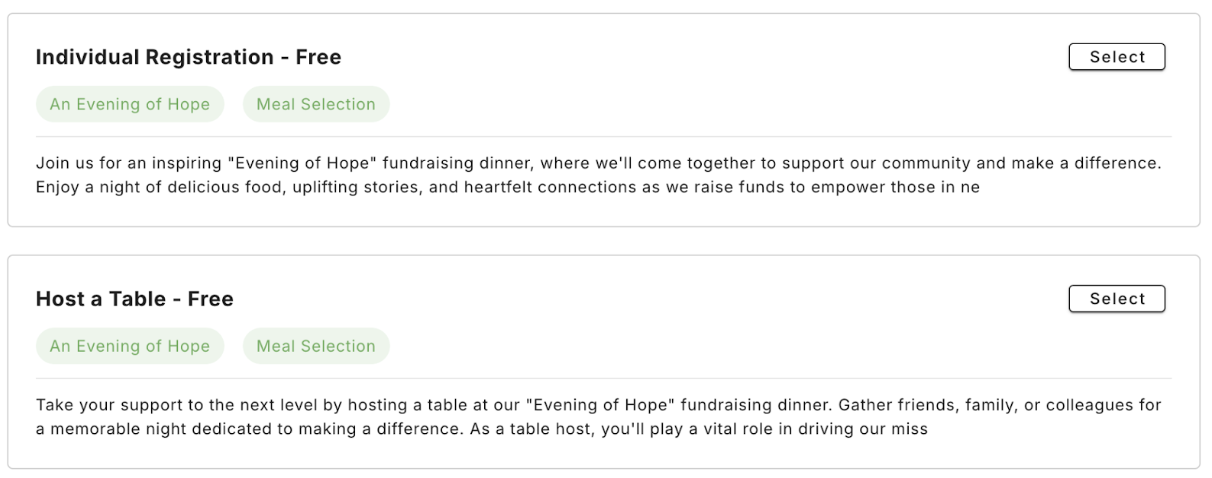
Q: Will the term "tickets" be used publicly in correspondence with event attendees? We don't sell tickets to our banquet and we don't prefer to use that terminology.
A: The term "ticket" is simply an internal term that you'll see when setting up your registration options. The "tickets" you set up will be the "registration packages" that your registrants can choose from. Here's an example of what that might look like:
Q: Does the Guest List Manager still exist?
A: Yes! Your Table Hosts will still have access to managing their guest list and it’ll be much improved! They’ll be able to manage multiple tables, send one of their reserved seats to a guest, and invite guests to fill their reserved seats on a first-come-first-served basis. Additionally, guests who reserve multiple seats will be able to manage their guest lists as well. This is a brand new feature, and great for those who are bringing others with them, but not filling/hosting a table.
Q: When entering a host registration, v3 only counted that as one seat and not 10 for the whole table. How does V4 handle this?
A: This is a super exciting update: table configurations will be a bundle of tickets, so a host will receive all 10 tickets (nine plus their own). You’ll be able to track the activity on each individual ticket, and they’ll count toward your total right off the bat.
Q: Will the table host need the names for all their guests when they original sign up? Or can they now just reserve a table of 10, for example?
A: They can now reserve a table of 10! This will save those 10 seats for them, preventing your event from reaching capacity even before the hosts get all of their guests’ names. Once they do confirm who will be coming they can update their guests’ information, or invite their guest to enter the information on their own.
Q: Is there a way to identify table sponsors and hosts for each table? We identify sponsors as those who pay for a table and hosts who do not pay for a table.
A: Yes, table configurations on the registration form will allow to set host options (with or without a fee). The Event Sponsors tool will allow you to set sponsorship packages that could also include a table to manage.
Q: Can a sponsor register as anonymous?
A: Yes!
Q: How will person profiles be handled? Will you still have the Duplicate Checker and the possibility for multiple profiles for the same people?
A: Registrations will be tied to an email address to avoid duplicates. The Duplicate Checker will be obsolete.
Q: If registration is based on email alone, how do we register guests who don’t have an email?
A: In keeping with industry standards, email is required for registration. You could determine to use a general email address you have access to (such as info@yourorg.com) for any guests that don’t have access to email. We've found that, in this day and age, it’s uncommon that even elderly guests wouldn’t have access to an email address.
Q: We have many guests without emails so having a required email is concerning. What about people who purchase multiple tickets? Will they be able to assign a name to each ticket?
A: They will be able to reserve three tickets, but cannot add names to those tickets without email addresses. They could use their own email address if their guests don’t have one, or you could determine to use a general email address you have access to (such as info@yourorg.com) for any guests that don’t have access to email.
Q: Can we import registrants' information from V3 to V4 using an Excel spreadsheet/CSV file?
A: As with v3, you can import contact information into the invitation tool to send out invites, but you won’t be able to import names to automatically register guests.
Q: Will we be required to use either physical or digital tickets, or is that optional?
A: Both will be an option, neither is required!
Q: Will there be a way to send reminders to attendees or Table Hosts via text?
A: Not at this time, but texting is on our long-term roadmap.
Q: Will v4 give us the ability to search attendees by name across multiple past events?
A: Unfortunately, this is one of the things we had planned originally, that won’t be possible with v4 being a complete rebuild. Our original plan was to update FundEasy’s codebase and database, however, as we began to move down that path we quickly realized that they had reached their development capacity. That’s why we instead moved forward with rebuilding FundEasy from the ground up. This precludes us from merging the v3 and v4 databases to allow for a complete history search tool.
Table Chart
Q: Can we import an Excel sheet chart or a PDF to the table chart in our event?
A: No, we don’t have a way to import a spreadsheet, but the table chart tools should make it quick and easy to recreate it!
Q: Can we import a table chart from one event to another?
A: Yes! You'll be able to import a table chart from one event in v4 to another event in v4 (table charts cannot be imported from events in v3).
Q: Can the table chart be exported?
A: Yes! A printable version of the table chart can be exported.
Q: Can we still see the table host's name on the table chart?
A: By default, no. However, tables on the table chart are no longer limited to numbers like they were in v3. You can name tables anything you’d like. For example, if you’d like to display the host’s name your table could be named “Table 6 (Jones)."
Q: Does the layout go by measurement of rooms so we know how many tables will fit in the space?
A: Not at this time, you would need to know how many tables you expect to have
Q: The table used to say how many seats were remaining. Will the be visible in v4?
A: Yes! When you hover over a table on the chart there is a popup with that information!
Live Check-in
For more information on v4 Live Check-in, click here.
Affiliation Tool
Q: Can we import last year's list into this year's event?
A: For your first event in v4, you may import a list from a spreadsheet to populate your Affiliations list. After that, it will live on year to year and can be edited/updated right on the Affiliation Tool page.
Integrations
Q: What integrations will be offered?
A: Our integrations aren’t finalized but we’ll continue to review requests and add new ones based on customer interest! Some of our most requested integrations are Virtuous CRM and Bloomerang so they are high on the list.
Miscellaneous
Donations
Q: Will v4 have giving/payment options?
A: The first v4 release will be for Free-to-Attend Attendance events only, but payments will be integrated into all our products soon, and the Donation Widget will also be available in all products!
Q: Will the donation page have a comment box (for gifts in memoriam, etc.)?
A: Yes, when the Donation Widget is released the donation page will include a comment option.
Reporting
Q: Will v4 have deposit reports?
A: v4 will have transaction reports. While some of the functionality was lost with the transition to Stripe, reports are making a comeback in V4!
Q: Will Stripe/Transaction reporting change?
A: Stripe encourages their customers to utilize the reporting options within their Stripe account. We have some improvements planned for down the road, though, to make the financial reports as user-friendly as possible.
However, v4 will soon allow multiple processors, so Stripe will not be your only option.
Other
Q: Will v4 have an app version of the main software?
A: We anticipate V4 being mobile friendly in the future, but not in a mobile app. Our current priority is building the web version. Once that’s done we’ll do a round of mobile optimization to make it mobile friendly through which web browsing app you use on your mobile device.
Q: Will v4 have a texting option for event communication?
A: Unfortunately, no. Texting is not included with the initial release, but is a planned improvement down the road!
Have more questions?
Please reach out to support@fundeasy.com or chat with us in real time from the question mark icon in the upper right hand corner of your account. We're happy to help!