

Upload your banner and choose the theme for your event from Event Design in Event Setup. If you don't have a banner, you can order one from Event Design.
Attendance
Theme Style
There are three theme styles: Modern, Casual, and Formal.
You can also click Options in the upper right corner to import a design you used in a past event. This article has more information on importing your design.
Banner
You have a couple options:Upload your own banner. Banners should be no less than 800 px wide. We suggest 1600 px X 840 px. Supported file types are JPEG, PNG, or GIF. Canva is a great way to create your own banner!
Want a professional's help? Have a banner created for you by Keener Marketing by clicking the link that says, "I would like FundEasy to design my event banners." Keener Marketing provides a professionally designed banner, including an image for your Facebook shares (the Facebook banner), within 24 hours for just $40. This Custom Design Fee includes 3 revisions. Additional revisions are $10 each. The fee will be included on your event invoice and issued after the event.
Facebook Banner - Add an image that is specifically designed to appear on your Facebook posts. This banner is also used on mobile devices. Recommended image size is 940 px wide and 492 px tall for high resolution. However, you can also use the 1600 px X 840 px graphic you used for your main banner because it is the same aspect ratio. When uploading it, you may get a message about it being the "wrong size" but since it's the same aspect ratio, it will be fine. Supported file types: JPEG, PNG, or GIF.
Color Palette - Select the colors and backgrounds for your event templates. Note: template borders do not show on email templates.
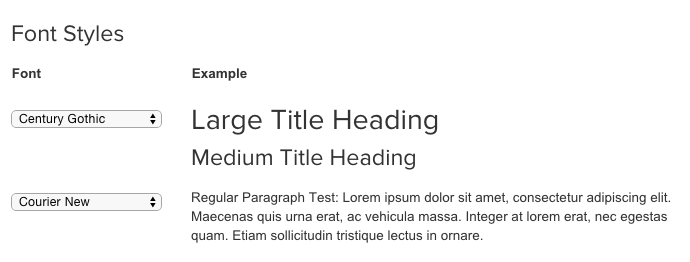
Font styles - Select font styles for headers and paragraphs. These styles will be used in all your templates.
More Options - these options differ based on the theme you've chosen
Remove the background pattern in the template
Remove the colored border surrounding the template
Enable the fancy silver ribbon in Casual
Enable the rounded corners in Formal
Enable the shuffled pages in Formal
Peer-to-Peer
Banner
You have a few options:Upload your own banner. Recommended image size is 2056 px wide and 514 px tall. Supported file types are JPEG, PNG, or GIF. Canva is a great way to create your own banner!
Want a professional's help? Have a banner created for you by Keener Marketing by clicking the link that says, "I would like to order custom desktop & mobile event banners." Keener Marketing provides a professionally designed banner, including an image for your Facebook shares (the Facebook banner), within 24 hours for just $40. This Custom Design Fee includes 3 revisions. Additional revisions are $10 each. The fee will be included on your event invoice and issued after the event.
Mobile Event Banner - Add an image that is specifically designed to appear on your Facebook posts and is also used on mobile devices. Recommended image size is 940 px wide and 492 px tall for high resolution images. Supported file types: JPEG, PNG, or GIF.
Accent Colors - Choose the colors that will surround your templates.