

Docs

How can we help you?

Our Knowledge Base is under construction to better serve you! If you can't find a category you've used in the past, use the search bar below to search for specific articles which may have moved to a new category!

How to Lookup an Event ID

Overview & Navigation

How to Lookup an Event ID

Last updated on 12 Feb, 2026

There are times when you might need to know your event ID for your event.

Here's how to look it up from inside your FundEasy account.

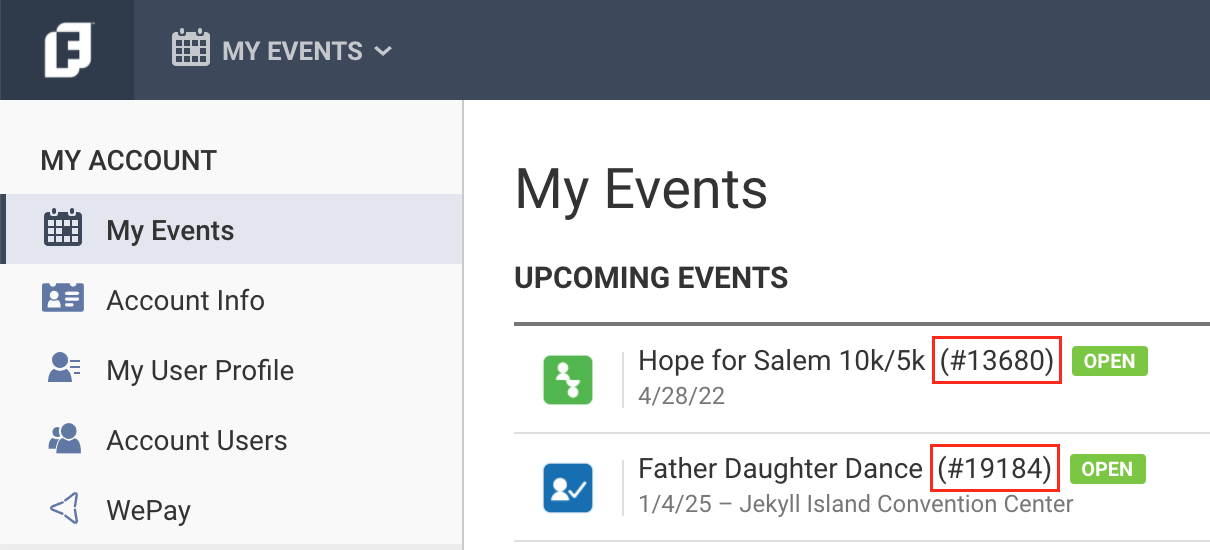
  1. In the My Events list, the event ID is in parentheses next to the name of your event.

Image
  1. Or you can choose the event in the My Events list and look in your browser's URL bar. You should see something like this:
    The number in the URL is your event ID: app.fundeasy.com/events/xxxxxx

Image
Was this page helpful?
Previous

Comparison of Peer-to-Peer and Crowdfunding

Next